Xiaolin Wu's Line Algorithm
Bresenham's line algorithm picks, for every column, the one pixel closest to the true line and colors it fully. That is fast and exact in its own terms, but on a slanted line it produces visible stair steps, often called "jaggies". The true line runs between pixel centers most of the time, and a pixel can only be on or off.
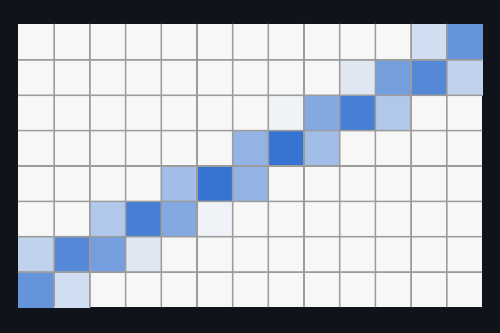
Xiaolin Wu's line algorithm, published in 1991, fixes that with one idea: instead of choosing one pixel per column, color two of them, and split the intensity between them according to how close the true line runs to each. The eye averages the two shades, and the line looks smooth, as if it were drawn at a position between the pixels.
The idea
Take a shallow line, one that moves more in x than in y. At a given
column, the true line passes through some height like y = 4.3. Bresenham
would round that to row 4 and color it. Wu looks at the two rows the line
runs between, 4 and 5, and splits the color by distance:
- row 4 is 0.3 away from the line, so it gets 70 % of the color,
- row 5 is 0.7 away, so it gets 30 %.
The fractional part of y decides everything: the pixel below gets
1 - fractional part, the pixel above gets the fractional part. For each
next column, y simply increases by the slope, exactly as the
error-tracking in Bresenham's algorithm does, so the whole line still
takes one pass with one addition per column. Steep lines are handled the
same way with x and y swapped.
Implementation
#include "plot.hpp"
#include <math.h>
#include <stdlib.h>

// A rectangular area of pixels. Each pixel stores how much of it is
// covered by lines, from 0 (background) to 1 (full line color).
struct Area {
    int x, y;        // position on screen
    int w, h;        // size in pixels
    int scale;       // drawn size of one pixel (1 = real size)
    float cover[200][280];
};

Area zoomBres = {20, 30, 28, 20, 10, {}};
Area zoomWu   = {340, 30, 28, 20, 10, {}};
Area fanBres  = {20, 260, 280, 200, 1, {}};
Area fanWu    = {340, 260, 280, 200, 1, {}};
Area* target;

void clear(Area& a) {
    for (int y = 0; y < a.h; y++)
        for (int x = 0; x < a.w; x++) a.cover[y][x] = 0;
}

// Add coverage c to a pixel. Where lines overlap, the new line covers
// part of whatever is still uncovered.
void plot(int x, int y, double c) {
    if (x < 0 || x >= target->w || y < 0 || y >= target->h) return;
    float& p = target->cover[y][x];
    p = p + (1 - p) * c;
}

// ---- Bresenham's line algorithm, as in the Bresenham article ----

void bresenham_line(int x0, int y0, int x1, int y1) {
    int steep = abs(y1 - y0) > abs(x1 - x0);
    if (steep) { int t = x0; x0 = y0; y0 = t; t = x1; x1 = y1; y1 = t; }
    if (x0 > x1) { int t = x0; x0 = x1; x1 = t; t = y0; y0 = y1; y1 = t; }

    int dx = x1 - x0, dy = abs(y1 - y0);
    int error = dx / 2;
    int ystep = (y0 < y1) ? 1 : -1;
    int y = y0;
    for (int x = x0; x <= x1; x++) {
        if (steep) plot(y, x, 1); else plot(x, y, 1);
        error -= dy;
        if (error < 0) { y += ystep; error += dx; }
    }
}

// ---- Xiaolin Wu's line algorithm ----

double fpart(double v)  { return v - floor(v); }   // fractional part
double rfpart(double v) { return 1 - fpart(v); }   // 1 - fractional part

void wu_line(double x0, double y0, double x1, double y1) {
    bool steep = fabs(y1 - y0) > fabs(x1 - x0);
    if (steep) { double t = x0; x0 = y0; y0 = t; t = x1; x1 = y1; y1 = t; }
    if (x0 > x1) { double t = x0; x0 = x1; x1 = t; t = y0; y0 = y1; y1 = t; }

    double dx = x1 - x0, dy = y1 - y0;
    double gradient = (dx == 0) ? 1 : dy / dx;

    // Plot along x, but swap back for steep lines.
    #define PLOT(a, b, c) (steep ? plot(b, a, c) : plot(a, b, c))

    // First endpoint: only the part of the pixel the line actually
    // reaches into counts (xgap).
    int xstart = (int)floor(x0 + 0.5);
    double yend = y0 + gradient * (xstart - x0);
    double xgap = rfpart(x0 + 0.5);
    PLOT(xstart, (int)floor(yend),     rfpart(yend) * xgap);
    PLOT(xstart, (int)floor(yend) + 1, fpart(yend) * xgap);
    double y = yend + gradient;

    // Second endpoint, the same way.
    int xstop = (int)floor(x1 + 0.5);
    yend = y1 + gradient * (xstop - x1);
    xgap = fpart(x1 + 0.5);
    PLOT(xstop, (int)floor(yend),     rfpart(yend) * xgap);
    PLOT(xstop, (int)floor(yend) + 1, fpart(yend) * xgap);

    // Everything in between: two pixels per column, split by how close
    // the true line runs to each of them.
    for (int x = xstart + 1; x < xstop; x++) {
        PLOT(x, (int)floor(y),     rfpart(y));
        PLOT(x, (int)floor(y) + 1, fpart(y));
        y += gradient;
    }
    #undef PLOT
}

// ---- Drawing ----

// Mix the line color into the background by the pixel's coverage. In the
// zoomed areas, empty pixels are drawn slightly darker so the pixel grid
// itself is visible.
void draw(const Area& a) {
    int bg = (a.scale == 1) ? 250 : 236;
    for (int y = 0; y < a.h; y++) {
        for (int x = 0; x < a.w; x++) {
            double c = a.cover[y][x];
            PlotColor(bg + (30 - bg) * c, bg + (100 - bg) * c, bg + (200 - bg) * c);
            int sx = a.x + x * a.scale, sy = a.y + y * a.scale;
            if (a.scale == 1) {
                PlotPixel(sx, sy);
            } else {
                PlotFilledRectangle(sx, sy, sx + a.scale - 2, sy + a.scale - 2);
            }
        }
    }
}

void setup() {
    PlotCanvas(640, 480);

    // A fan of lines at real size, every 6 degrees from 0 to 90.
    for (int i = 0; i <= 15; i++) {
        double angle = i * 6 * M_PI / 180;
        double x1 = 5 + 270 * cos(angle), y1 = 195 - 190 * sin(angle);
        target = &fanBres; bresenham_line(5, 195, (int)floor(x1 + 0.5), (int)floor(y1 + 0.5));
        target = &fanWu;   wu_line(5, 195, x1, y1);
    }
}

void frame() {
    // The same slowly rotating line in both zoomed areas.
    double angle = g_current_frame * 0.004;
    double cx = 13.5, cy = 9.5, r = 8.5;
    double x0 = cx - r * cos(angle), y0 = cy - r * sin(angle);
    double x1 = cx + r * cos(angle), y1 = cy + r * sin(angle);

    clear(zoomBres);
    target = &zoomBres;
    bresenham_line((int)floor(x0 + 0.5), (int)floor(y0 + 0.5),
                   (int)floor(x1 + 0.5), (int)floor(y1 + 0.5));
    clear(zoomWu);
    target = &zoomWu;
    wu_line(x0, y0, x1, y1);

    PlotBackground(250, 250, 250);
    draw(zoomBres);
    draw(zoomWu);
    draw(fanBres);
    draw(fanWu);

    PlotColor(40, 44, 52);
    PlotText(20, 8, "Bresenham");
    PlotText(340, 8, "Wu");
    PlotText(20, 238, "Bresenham, real size");
    PlotText(340, 238, "Wu, real size");
}
The top half shows the same slowly rotating line twice, enlarged so that every pixel is visible: on the left drawn with Bresenham's algorithm, exactly as in the Bresenham article, and on the right with Wu's. The bottom half draws a fan of lines at real size, where you can see what the difference actually looks like at normal viewing distance.
A pixel's intensity here is how much of it the line covers, from 0 to 1. To turn that into a color, the sample mixes the line color into the background color by that amount. Where two lines cross, as near the center of the fan, a new line only covers part of what is still uncovered, so overlapping pixels get darker without ever going past the full line color.
wu_line itself follows the classic formulation. The loop in the middle
is the whole idea from above: two PLOT calls per column, with
rfpart(y) and fpart(y) as their intensities. The extra code before the
loop handles the two endpoints. A line that ends exactly at a pixel's
center only covers half of that pixel, so the end pixels get only part of
the color (the xgap factor). With whole-number endpoints, as in the fan,
that is always exactly half: the ends of every line are drawn at half
intensity on purpose, not by mistake.
Wu's original version used integer fixed-point arithmetic, in the spirit
of Bresenham's algorithm. This one uses double to keep the idea easy to
follow.
How it relates to Bresenham
Checked over 20,000 random lines, three properties always hold for the columns between the endpoints:
- the two intensities in a column always add up to exactly 1, so the line has the same total brightness everywhere,
- the weighted average of the two pixel positions is exactly the true line's position, which is what makes the line appear to sit between pixels,
- the brighter of the two pixels is always the one Bresenham's algorithm would have picked, in all 523,599 columns where one of them was brighter.
The last point makes the relationship very direct: Wu's algorithm is Bresenham's line, plus one neighboring pixel per column that receives whatever share of the color the main pixel did not get.
The trade-off
Antialiasing trades sharpness for smoothness. That is most visible when
the line runs exactly halfway between two rows of pixel centers. In the
first frame of the animation, the rotating line is almost exactly
horizontal, at y ≈ 9.5: Bresenham draws a sharp line one pixel thick
(with a single step in the middle, where its rounding flips from one row
to the next), while Wu draws two rows at almost half intensity each, which looks wider and lighter. As the line
turns, the split keeps shifting, and at most angles the result looks far
smoother than Bresenham's steps. But a perfectly horizontal or vertical
line placed exactly on pixel centers is still sharpest with plain full
pixels.
Conclusion
Xiaolin Wu's algorithm keeps everything that makes Bresenham's algorithm fast, one pass along the line and one addition per step, and spends the little extra work on a second pixel per column. The result is a line that can sit anywhere between the pixels, at almost no extra cost, which is why it became one of the best-known ways to draw antialiased lines in software.