Ripgrep and Regular Expressions in Practice
Ripgrep (rg) is one of the most useful tools I know for working with
larger software projects. Especially when I'm examining unfamiliar or
AI-generated C/C++ code, I want to find out quickly where certain
functions are used, which files are affected, or whether similar
constructs appear more than once.
The strength of rg lies in the combination of high speed, recursive file
search, and regular expressions.
Simple searches
An ordinary search in the current directory:
rg 'moveItemsOneTile'
Search only in the source directory:
rg 'moveItemsOneTile' src/
With line numbers and three lines of context:
rg -n -C 3 'moveItemsOneTile' src/
Print only the names of the affected files:
rg -l 'moveItemsOneTile' src/
With -t you can select specific file types:
rg -t cpp 'moveItemsOneTile'
The available file types are shown by:
rg --type-list
Literal search with -F
I don't always need regular expressions. When I'm searching for a specific file name, for instance, I use:
rg -F 'config.json'
Without -F the dot would have a special meaning: in regular expressions
it stands for any character.
The equivalent regex pattern would therefore have to be:
rg 'config\.json'
-F is particularly handy for function names, error messages, and paths,
because it saves me from thinking about regex metacharacters.
The most important regex constructs
The following constructs cover a large part of my daily work:
| Pattern | Meaning |
|---|---|
. |
Any character except a newline |
^ |
Start of line |
$ |
End of line |
\b |
Word boundary |
\s |
Whitespace, including spaces and tabs |
\t |
Tab |
\d |
Digit |
[0-9] |
Digit between 0 and 9 |
[abc] |
One of the characters a, b, or c |
[^abc] |
Any character except a, b, or c |
* |
Zero or more repetitions |
+ |
One or more repetitions |
? |
Zero or one repetition |
{3} |
Exactly three repetitions |
{2,5} |
Two to five repetitions |
(a|b) |
Alternative: a or b |
For example,
rg '^\s*if\s*\(' src/
finds lines that begin with an if statement after optional spaces or
tabs. The pattern works regardless of how many spaces sit between if and
the opening parenthesis.
Using word boundaries
When I search for a variable named item, I don't necessarily want to find
itemCount or items as well.
rg '\bitem\b' src/
There is also a short form for this:
rg -w 'item' src/
Word boundaries are especially helpful when searching for C++ identifiers.
Case can be ignored with -i:
rg -i 'readmap' src/
With -S, rg makes a smart distinction: if the search pattern contains
uppercase letters, case is respected; otherwise it is not.
Groups and alternatives
Often I want to find several related functions at once. For example:
rg 'Game::(readMap|writeMap|saveMap|loadMap)' src/
The expression searches for all four methods.
The technique also works well for comments:
rg -n 'TODO|FIXME|HACK|XXX' src/
Groups are useful for optional parts, too:
rg '\bcolors?\b' src/
That finds both color and colors.
Repetitions
Repetition operators let me describe variable text structures. A four-digit number, for example:
rg '\b[0-9]{4}\b'
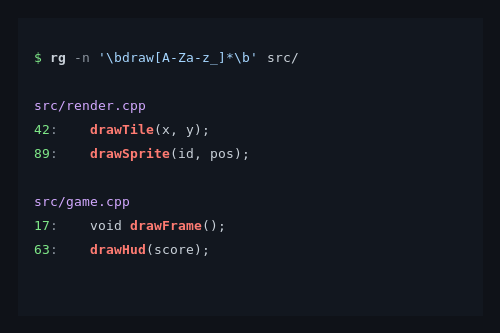
Or an identifier that begins with draw:
rg '\bdraw[A-Za-z_0-9]*\b' src/
Here the star means that any number of the listed characters may follow
draw.
The difference between * and + matters:
rg 'foo\s*bar'
rg 'foo\s+bar'
The first expression also allows foobar without a space. The second
requires at least one whitespace character.
Finding functions in C++ code
A typical task is finding all uses of a function.
rg -n '\bmoveItemsOneTile\s*\(' src/
That finds the function name followed by an opening parenthesis, regardless of the spaces in between.
A search for qualified methods:
rg -n 'Game::[A-Za-z_][A-Za-z_0-9]*\s*\(' src/
This finds Game::readMap or Game::update, for example.
However, rg cannot reliably distinguish between definitions,
declarations, and calls. For actual C++ symbol navigation I therefore use
RTags.
Regex is a text search, not a complete C++ parser.
Multiline search
Normally rg searches each line individually. With constructs like
if (ready)
{
    start();
}
that can be a problem.
With -U I enable multiline search:
rg -U 'if\s*\(ready\)\s*\{' src/
This also finds an opening brace on the next line.
Note that even with -U, the dot does not automatically match newlines.
For such cases there is the expression (?s:.*?), for example.
With complex C++ structures, multiline regex searches should be used with care.
Narrowing down search results
In larger projects I often want to exclude build directories or third-party libraries.
rg 'SDL_Renderer' -g '!build/**'
Search only specific file extensions:
rg 'SDL_Renderer' -g '*.cpp' -g '*.hpp'
With -o, only the matches themselves are printed:
rg -o 'Game::[A-Za-z_][A-Za-z_0-9]*' src/main.cpp
Combined with Unix tools, that turns into simple analyses:
rg -o 'Game::[A-Za-z_][A-Za-z_0-9]*' src/main.cpp | sort -u
This gives me a list of the distinct method names.
Note that rg respects the rules from .gitignore by default. If files
appear to be missing, it's worth checking the ignore rules as well.
Using rg to search help texts
Another practical application is searching long help texts. When I'm
looking for the -F parameter in rg's own help, for instance:
rg --help | rg -n -A 8 -- '^[ \t]*-F,'
The pattern looks for an indented option entry starting with -F,. -A 8
additionally shows eight following lines.
The double dash -- marks the end of the command line options. That makes
it possible to use search patterns beginning with a dash.
If I know the long option name, I can search more easily:
rg --help | rg -C 3 -F -- '--fixed-strings'
In a man page I can search for a term with / and then move between
matches with n and N.
Regular expressions and the shell
I normally write my search patterns inside single quotes:
rg '^\s*if\s*\(' src/
This prevents the shell from interpreting special characters prematurely.
For known strings coming from shell variables I prefer -F:
searchtext='Game::readMap'
rg -F -- "$searchtext" src/
That is simpler and less error-prone.
Limits of regular expressions
Ripgrep uses a fast regex engine by default that does not support certain advanced constructs. These include look-ahead, look-behind, and backreferences within the search pattern.
If ripgrep was compiled with PCRE2 support, I can use -P for those:
rg -P 'foo(?=bar)' src/
That finds foo when it is immediately followed by bar.
For most tasks, however, the normal regex engine is entirely sufficient.
It also holds that regular expressions cannot replace a full analysis of a programming language. With templates, macros, and nested C++ constructs in particular, text search reaches its limits.
My practical workflow
When examining C++ projects, I now use these tools for different jobs:
| Tool | Purpose |
|---|---|
rg |
Find text locations and patterns quickly |
| RTags | Examine definitions and references |
| Lizard | Detect complex and overly long functions |
| Emacs | Read and edit source code |
When Lizard reports a function with high cyclomatic complexity, for
instance, I first search for its name with rg:
rg -n -F 'moveItemsOneTile' src/
Then I display the matches with context:
rg -n -C 5 -F 'moveItemsOneTile' src/
For the deeper investigation I switch to Emacs and RTags.
The advantage of this way of working is that I don't have to understand the entire project right away. I can work my way step by step from a concrete question to the relevant places in the source code.
Conclusion
The most important insight when using rg is that not every search needs a
complicated regular expression.
For known strings I use -F. For variable spellings I use word
boundaries, character classes, repetitions, and groups. With -g, -C,
and -l I can narrow down the result set deliberately.
I find the combination with classic Unix tools like sort, uniq, and
awk particularly useful.
Anyone who masters these few capabilities can examine even large software projects considerably faster, without needing an extensive development environment for it.