RTags: Real C++ Code Navigation
In my ripgrep article I wrote
that rg cannot reliably distinguish between a function's definition, its
declaration, and a call to it — regex is a text search, not a C++ parser.
RTags is the tool I reach for once that distinction actually matters: it
indexes C/C++ source using libclang, the same parser Clang itself uses to
compile the code, so its answers come from an actual understanding of the
language rather than a pattern match.
What RTags actually is
RTags is a client/server pair. rdm is a daemon that parses your project
with libclang and keeps the result — an index of every symbol,
definition, declaration, and reference — in memory and on disk. rc is a
small command-line client that talks to rdm over a local socket and asks
it questions: where is this defined, who calls this, what does this symbol
expand to.
Because rdm uses the real Clang frontend, it needs to know exactly how
each file is compiled — the same include paths, defines, and standard
version the actual build uses. That's what a compilation database
(compile_commands.json) provides, and it's the one piece of setup RTags
genuinely requires.
Generating a compilation database
If the project uses CMake, this is one flag:
cmake -DCMAKE_EXPORT_COMPILE_COMMANDS=ON -B build
CMake writes build/compile_commands.json, a list of every translation
unit with the exact compiler invocation used to build it.
For a plain Makefile project, bear
intercepts the actual compiler calls during a real build and generates the
same file:
bear -- make
Either way, the result is a JSON file RTags can point at — it doesn't matter which build system produced it.
Starting the daemon and loading a project
rdm &
rc -J /path/to/build
rc -J points RTags at the directory containing compile_commands.json
and tells rdm to index the project. For a large codebase this takes a
while the first time; afterwards rdm only reindexes files that actually
changed.
Checking indexing progress:
rc --is-indexing
The core queries
Everything below assumes the cursor position is given as file:line:column
— in practice an editor integration fills this in automatically, but it's
useful to see the raw form at least once.
Go to the definition of the symbol under the cursor:
rc -f src/game.cpp:42:10
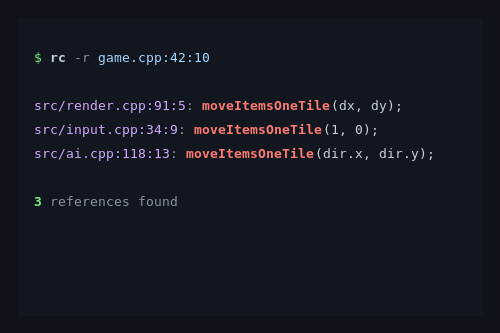
Find every reference to a symbol — every place it's used, not just where it's declared:
rc -r src/game.cpp:42:10
Find references by name, without needing a cursor position at all:
rc -R moveItemsOneTile
List all overridden/overriding virtual methods for a symbol:
rc -w src/game.cpp:42:10
Find every file containing a given symbol name, useful as a first, broader pass:
rc --find-symbols moveItemsOneTile
Find a file by (partial) name across the project:
rc -F game.cpp
The difference to rg -l 'moveItemsOneTile' src/ from the ripgrep article
is exactly the distinction regex can't make: rc -r only returns actual
references resolved through the type system — not a comment that happens
to mention the function name, not a string literal, not an unrelated
overload with the same name in a different class.
Reindexing after an edit
RTags reindexes a file automatically once it notices the change (it watches the files it knows about), but after a larger edit — a header change that affects many translation units, for instance — it can help to trigger it explicitly:
rc -e src/game.hpp
Checking whether a specific file is currently up to date in the index:
rc --dump-file-maps src/game.cpp
Editor integration
RTags is most useful from inside an editor, where file:line:column is
implicit — the cursor position is the query. The project ships
rtags.el for Emacs, and rc is simple enough to script against from
other editors that can shell out and parse the result.
In Emacs, with rtags.el loaded, the everyday bindings are:
rtags-find-symbol-at-point— go to definitionrtags-find-references-at-point— find all referencesrtags-find-virtuals-at-point— list overridesrtags-rename-symbol— rename a symbol project-wide, following actual references rather than text matches
That last one is worth calling out: a rename driven by rg/sed has to
guess which textual occurrences are the right ones and will happily touch
an unrelated symbol that happens to share a name. A rename driven by
RTags only touches what the index resolved as the same symbol.
Where RTags stops being useful
RTags needs a project that actually compiles, or at least one where
libclang can parse each translation unit far enough to resolve symbols.
A half-written, currently-broken file degrades to partial results for that
file specifically — the rest of the index is unaffected, but it's a
different failure mode than ripgrep's, which never cares whether the code
compiles at all.
It's also heavier to set up: a compilation database, a running daemon, and
an initial indexing pass, versus rg's zero-configuration, instant-start
text search. For a quick "does this string appear anywhere in this repo,"
rg is still faster to reach for — RTags earns its cost once the question
becomes "what does this symbol actually mean here."
How I actually use the two together
My workflow from the ripgrep article extends directly here. Lizard
flags a function with high cyclomatic complexity; I locate it with rg
first, since that needs no indexing step and is instant even on a project
I haven't touched yet:
rg -n -F 'moveItemsOneTile' src/
Once I'm actually inside the function and need to understand its callers,
its overrides, or trace a rename through the whole project, I switch to
RTags inside Emacs. rg tells me where something appears; RTags tells me
what it is and where it's actually used — two different questions that
happen to both start with "find this name in the code."
Conclusion
Regex-based search and a language-aware index solve different problems
that look similar from the command line. rg is fast, requires nothing
set up, and searches text — good for "I don't yet know what I'm looking
for." RTags requires a compilation database and a running daemon, but
answers with actual semantic understanding of C/C++ — good for "I know
exactly what this symbol is, now show me everywhere it matters." Knowing
which question you're actually asking is most of the decision between the
two.